Your Passwords Aren’t Safe Unless You’re Taking These 5 Steps

Passwords are the gateway to your online accounts, but many people treat them as an afterthought. With access to over 847 million exposed passwords in the public domain, hackers can easily to steal identities, credit card numbers and commit other types of fraud without the need for complex password crackers. If you use the same password for multiple accounts and haven’t updated it in years, you could become a victim!
Let’s take a look at five steps to ensure that your passwords effectively secure your online accounts.
Table of Contents
Step 1: Create Strong Passwords
You can probably guess some of the most common passwords that appear in security breaches: “123456”, “password”, “12345”, “12345678”, and “qwerty”. Of course, criminals can guess these passwords just as easily and many online accounts are quickly compromised with these simple guesses — no need for a password cracker.
Most experts advise you to create passwords that:
- Have a minimum of 12 characters.
- Include numbers, symbols, uppercase and lowercase letters.
- Aren’t dictionary words or combinations of dictionary words.
- Don’t rely on obvious substitutions, e.g. “passw0rd”.
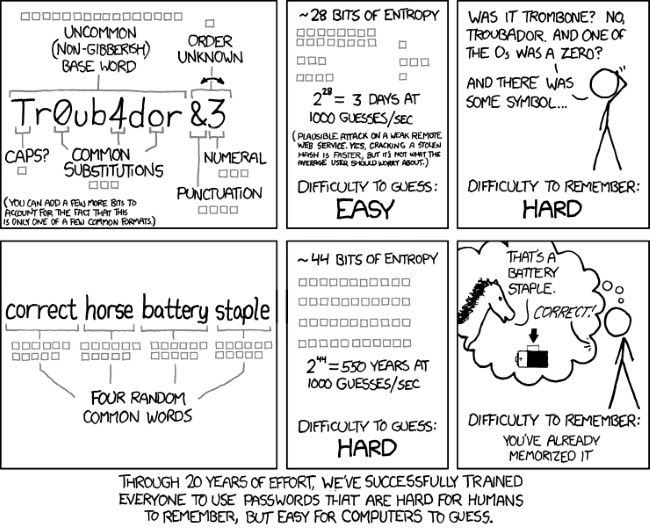
The problem is that passwords like “x$tg@8EmW[%9=Af`” are impossible for anyone to remember — at least without a photographic memory.
The good news is that you can generate strong and memorable passwords by combining four or more random words that aren’t in any grammatically correct order. These words make sense to humans, but since the password is longer, it takes longer for a computer to guess the phrase than a shorter sequence of random characters.
Step 2: Use Different Passwords
Most people (54%) use five or fewer passwords across their entire online life, according to a TeleSign survey. When averaging all 2,000 users in the survey, researchers found that people use only six unique passwords to guard 24 online accounts. A single data breach would give hackers everything they need to get into several different accounts.
You can avoid these security issues by using different passwords for different accounts.
For example, your bank account passwords should be different from your social media account passwords. That way, if a social media service is compromised, hackers couldn’t use the same passwords to access your bank accounts.
Of course, the biggest challenge with using different passwords is remembering them all.
Again, password managers make it easy to keep all of these passwords in one place behind a master password. You can then easily use different passwords for different accounts without having to remember them all.
It’s also a good idea to use different usernames across these accounts.
If you have the same username, it’s even easier for hackers to try logging into many different services to try and gain access. Usernames don’t have to be completely random, but they should be difficult to randomly guess.
Step 3: Regularly Update Passwords
TeleSign’s survey found that 21% of people use passwords that are over 10 years old and 47% of people use passwords that are at least five years old. These stale passwords are a major security risk that most people fail to appreciate.
The growing number of data breaches means that many of these old passwords have been exposed to hackers.
According to HaveIBeenPwned, there have been more than 847 million real word passwords exposed in data breaches, including many that are paired with email addresses.

You can search the database to see if your email address and/or password have been compromised at: https://haveibeenpwned.com.
It’s a good idea to update your passwords on a regular basis, such as quarterly or yearly. For example, you might update your banking password when you do your taxes each year or update your social media passwords at the beginning of each year.
Step 4: Use Two-Factor Authentication
Two-factor authentication, or 2FA, provides an extra layer of security above and beyond a password. If you’re using a service that offers 2FA, it’s a good idea to set it up to prevent the vast majority of cybersecurity attacks.
There are several different types of 2FA:
- Hardware tokens are key fob-like devices that produce a new numeric code every 30 seconds. When accessing your account, you can glance at the device to get the code and enter it. These are common at many workplaces.
- Software tokens are similar codes created with apps with Google or Microsoft apps connected to your account. When accessing an account, you open the app to get the code, and then enter the code to access the account.
- SMS messages can be used to send a one-time unique passcode after attempting to login. Without access to the user’s phone, hackers cannot mimic these unique passcodes, which makes them extra secure.
2FA goes a long way in protecting accounts with an extra layer of security, but they’re not invulnerable to attack.
For example, a hacker could trick you into providing a 2FA code that they could turn around and use. Or, a hacker may have already compromised your Google or Microsoft accounts. It’s important to use a wider cybersecurity strategy to prevent these issues from occurring.
Step 5: Securely Share Passwords
Many small businesses need to share passwords between employees. While some apps may support many users under a single organization, others only support a single login or may charge extra fees for each additional user. Small businesses that don’t want to pay for extra seats or only have a few employees may be tempted to share account access.
Unfortunately, many businesses store these passwords on a shared Google Sheet or spreadsheet with communal access. This approach is very risky because it only takes a single user account to be compromised to expose all of your business’s passwords and accounts!
TeamPassword is designed to make it easy to securely share passwords between team members. Even better, the software works as a password manager to auto-populate passwords where required and easily generate and remember secure passwords for new sign-ups. You can even view logs to see who has accessed certain passwords.
Sign up for a free 14-day trial to see how it works!
The Bottom Line
Passwords are the gateway to your online accounts, but many people treat them as an afterthought. By keeping these tips in mind, you can minimize the odds of becoming a victim of a security breach and save yourself from hours of pain and thousands of dollars of possible losses.
おすすめの記事
The Ultimate Employee Offboarding Guide for Data Security
What’s the plan when an employee leaves? Properly handing off company information when an employee leaves can be ...
What is password encryption and how does it work?
Password encryption is the number one component of password security. TeamPassword encrypts passwords with state-of-the-art technology to keep ...
Cybersecurity for Utilities: Common Threats & Best Practices
The utilities sector is ripe for cyber threats. Learn more about these threats and how to prevent them ...
7 Cybersecurity Risks of Using Personal Devices for Work
Bring your own device policies are increasingly popular as remote work trends continue. With them come risks. This ...